How this Website is Deployed
April 10, 2024 by Jane

How this Website is Deployed

This is more like a note to my future self, when I see hosting prices changing again, want to find a new hosting service, and wonder how I did it all in 2020.


I'm currently using Ionos 1&1 to host and it's been very finicky, I was lucky to have found the instructions here: https://github.com/ansoncoding/django-shared-hosting-1and1 of someone else who's done it before. The tricky thing is these shared hosting don't give the user root permission, so it's very tricky to install things like SSL.


I managed to make it work back in 2020 and recently got a new domain and simply updated the setting.py via SFTP. After the setup it's easier to update the files only without having to reconfigure the Django setup.


I think in the future it would make sense to move to a real server hosting such as Heroku.

SOLID Principles of Software Design
October 06, 2023 by Jane

SOLID Principles

SOLID

Single Responsibility - each class should only do one thing. This is linked to coupling and cohesion amongst classes

Open/Closed Principle - each module should be flexible enough to accomodate different inputs without changes. If there's drastic changes the preference is to extend the code not modify it for backwards compatibility.

Liskov Substitution Principle - all subclass objects should be able to subsitute their parents, if inheriting an interface or a parent class, completely implement the interface.

Interface Segregation Principle - have smaller interfaces that are highly cohesive, then stitch them together with multiple inheritance when you need to use functionality from more than one interface. It's better than having a fat interface that the client doesn't really need and is stuck with awkward choice of implementing the whole interface when it doesn't need to so as to avoid violating the Liskov Substitution Principle or violating the Liskov Substitution Principle for efficiency and creating mines that might hurt themselves later on.

Dependency Inversion Principle - aim to build a system that is modular, loosely-coupled, and easily tested (having module and loosely-coupled helps with modular testing). This can usually be done by abstracting modules with interfaces so that the business logic doesn't interact with each other directly.

Dog Teaches Living
October 05, 2023 by Jane

Came across this old gem

Remember, if a dog was the teacher you would learn things like:
• When your loved ones come home, always run to greet them.
• Never pass up the opportunity to go for a joyride.
• Allow the experience of fresh air and the wind in your face to be pure Ecstasy.
• Take naps.
• Stretch before rising.
• Run, romp, and play daily.
• Thrive on attention and let people touch you.
• Avoid biting when a simple growl will do.
• On warm days, stop to lie on your back on the grass.
• On hot days, drink lots of water and lie under a shady tree.
• When you’re happy, dance around and wag your entire body.
• Delight in the simple joy of a long walk.
• Be faithful.
• Never pretend to be something you’re not.
• If what you want lies buried, dig until you find it.
• When someone is having a bad day, be silent, sit close by, and nuzzle them gently.

Learning Programming Languages
May 25, 2023 by Jane

Learning Programming Languages

Basics

1. Syntax (learn the way the language looks and feels)

2. Frequency (learn the most frequently used keywords and functions such as + - * /)

3. Complexity (learn the simplist concepts first such as loops, switch statements, conditionals, assignment)

4. Practice with a machine (theory and practice go hand-in-hand)

5. Discuss with fellow programmers (in order to improve, be content to be thought foolish and stupid)

6. Summarize (how does this new knowledge tie in with the existing knowledge in my mind?)


Advanced

1. Patterns ( learn the way objects, patterns, commonly used formats look and feel in the code)

2. Frequency (learn less frequently used but still important concepts that are prevalent such as objects, templates, memory management, data structs etc)

3. Complexity (learn the more complex concepts such as patterns, architechture design)

4. Practice with a machine, maybe serveral machines (theory and practice go hand-in-hand)

5. Discuss with fellow programmers (in order to improve, be content to be thought foolish and stupid)

6. Summarize (how does this new knowledge tie in with the existing system in place?)

Learning Spoken Languages
May 25, 2023 by Jane

Learning Spoken Languages

Basics

1. Frequency (learn the most frequently used words, phrases, sayings)

2. Complexity (learn the least complex topics first, pertaining to kindergartener level banter)

3. Practice (if you want to improve, be content to be thought fooolish and stupid)

4. Reflect (condense the information into smaller chunks of knowledge, related to each other so it's easier to recollect)


Advanced

1. Less frequent sayings (aimed at more descriptive, more flavorful conversation)

2. Complexity (can dabble in more complex topics that are abstract and vague)

3. Practice (if you want to improve, be content to be thought foolish and stupid)

4. Reflect (condense the information into smaller chunks of knowledge, related to each other so it's easier to remember)

  • use acronyms
  • seek patterns
Python __call__ method
November 18, 2021 by Jane

Did you know it's possible to use an object as a function? Learn about the Python __call__ method!

In Python there are a lot of built-in methods, including the infamous __main__ method. __call__ is another built-in method. The way it works is that it makes it possible to call an object like a function.

We're familiar with this code:

my_obj = Obj() // constructed


However did you know you can do this?

my_obj()


Yes. This is possible if we define the __call__ built-in method.


E.g.

class Obj():

    def __init__(self):
       print('init called')

    def __call__(self):

        print('use object as function')


> my_obj = Obj

init called

> my_obj()

use object as function

Linear Regression and Hyperparameter Tuning
September 16, 2020 by Jane

Rephrase summary of hyperparameter tuning (Google's Machine Learning Course)

Summary of hyperparameter tuning

The 3 parameters of hyperparameter tuning are: batch size, learning rate, and epoch length.


If the training loss graph is oscillating it means the learning rate is too high. 

If the training loss graph doesn't converge (slope approaches zero) towards the end, try adding more epochs.

If the training loss graph is converging too slowly, try to increase the learning rate.

Lowering the learning rate while increasing the number of epochs or the batch size is often a good combination.

The batch size has to fit into memory.

To tune batch size, start with a larger number then decrease it till you see degradation on results.

Because the hyperparameters tuning is data-dependent so we must experiment with the values.

Pandas DataFrame Intro
September 15, 2020 by Jane

Pandas DataFrame (Google Machine Learning Course)

What is pandas DataFrame?

data structure in pandas API


What is a DataFrame?

  • stores data in cells
  • usually contains named column and rows


Import pandas module

import pandas as pd


Creating a DataFrame:

  1. create a NxM matrix
  2. create an array of strings that holds the column names
  3. dataframe = pd.DataFrame(data=matrix, columns=column_names)


Adding a new column to DataFrame

  • assign values to a new column name
  • E.g. dataframe['new_column_name'] = 2
  • E.g. dataframe['new_column_name'] = dataframe['existing_column'] + offset


Selecting DataFrame columns:

  • dataframe.head(n) // select the first n rows of the dataframe
  • dataframe.iloc([[n]]) // select single row indicated by n 
  • dataframe[1:4] // select rows 1 - 4 exclusive (i.e. row 1, 2, 3)
  • dataframe['column_name'] // select column with 'column_name'


Copying DataFrames

  • Referencing: assign a DataFrame to a new variable, the changes in any of the variables will be reflected across
  • Copying: using pd.DataFrame.copy to copy a deep copy
NumPy Intro (Google Machine Learning Course)
September 14, 2020 by Jane

NumPy Intro (Google Machine Learning Course)

Importing the NumPy module

import numpy as np 


Populating Arrays

array = np.array([1.2, 2.4, 3.5, 4.7, 6.1, 7.2, 8.3, 9.5]) // create 1D array

matrix = np.array([[6, 5], [11, 7], [4, 8]]) //create 2D array

seq =  np.arange(5, 12) // create an array consisting of integers 5, 6, 7, 8, 9, 10, 11 - the range is [a, b)

randints = np.random.randint(low=50, high=101, size=(6)) // create an array of 6 with random integers  from 50 - 100 

randfloats = np.random.random([6]) //default is to create random floats between 0 and 1

array_zeros = np.zeros([6]) // populate an array with 6 zeros

array_ones = np.ones([6]) // populate an array with 6 ones


Broadcasting:

A feature of NumPy that when two matrices are not the same size for the intended operation, it will expand the smaller operand to dimensions that can be operated on for linear algebra.

E.g. randfloats = np.random.random([6]) + 2.0

  • broadcasting will expand 2.0 to [2.0, 2.0, 2.0, 2.0, 2.0, 2.0] 
Reinstall MS Store
August 23, 2020 by Jane

Reinstall MS Store

Open Powershell in Admin mode and paste:

Get-AppXPackage *WindowsStore* -AllUsers | Foreach {Add-AppxPackage -DisableDevelopmentMode -Register "$($_.InstallLocation)\AppXManifest.xml"}


The command should complete in seconds

Slack Beginner's Guide
July 20, 2020 by Jane

Slack shortcuts

Slack has become the new Skype. In my own opinion of course.


Let's learn some Slack shortcuts.


Esc to mark all messages in current channel as read

Alt + click on message to mark message as unread

Ctrl + / to view all shortcuts

Ctrl + F to search

Ctrl + . to collapse/open right side panel

Ctrl + D to collapse/open left side bar

Ctrl + up arrow to edit last message

Ctrl + Shift + S to open bookmarks or saved items

Ctrl + Shift + C to format selected text as code

Ctrl + Shift + 8 to format selected text as bullet points

Ctrl + Shift + 7 to format selected text as numbered bullets

Perforce Starter Guide
July 19, 2020 by Jane

Perforce Checkout
Perforce Commit

Perforce Concepts

  • Depot: folders on the Perforce server
  • Workspace: defines a mapping of files between the server and client which is stored on the server and can be edited. 
  • Changelist: a list of files to be watched for changes (Perforce doesn't watch files automatically like Git)
  • P4V: GUI client application to talk to Perforce server
  • Checkout: the action of marking a file to be in the changelist so it can be edited (otherwise all files are read-only)
  • Sync: download files from depot to local file system
  • mainline: master branch equivalent of of Git
  • streams: similar to branches on Git


Icon meanings:

  • Green circle: you have the most current version
  • Check mark: someone is working on this file
  • Red X: file will be deleted


GUI navigation:

  • Workspace tab: shows checked out files
  • Depot tab: shows all files on server


Finding the size of depot in P4: p4 sizes -s //depot/directory/... (* must include the ellipses)


Creating a new workspace: Depot tab > select create new workspace in dropdown > fill in the workspace name > fill in local folder to store the checkout > methods below:

  • Method 1: select the depot(s) in the GUI > click Open
  • Method 2: click on text editor symbol on right-hand side > use the text editor select the depots > click Open
  • * Note the workspace name must be specific enough or P4V will not be able to creat the workspace and pop an error with "workspace name is to ambiguous". Try adding more numbers to the workspace name longer and more specific as a fix


Checkout: 

  • Method 1: right-click on depot in workspace > Get Latest revision 
  • Method 2: right-click on depot in workspace > Get revision > ensure get latests revision is selected


Force Sync: right-click on depot > Get revision > Check the box with "Force Operation"


Creating a changelist: pending tab > double click on default changelist > write a description > expand to see checked out files


Adding a newly created file to changelist:

  1. Create the new file in Windows Explorer
  2. Go to P4V and refresh (the file will appear but be unmarked)
  3. Right-click > mark for add > select changelist where the addition should be made


Adding a file to changelist:

  • Method 1: drag the file you want to add to the changlist in the GUI
  • Method 2: right-click on the file and select checkout


Deleting files:

  1. Locate the file to be deleted
  2. Right-click > mark for delete > select changelist where deletion should happen
  3. The file will be marked with red x meaning the file will be deleted in the commit


Revert local changes:

  • Method 1: find the file to revert in the changelist > right-click > revert
  • Method 2: find the file to revert in the changelist > Ctrl + R


Commit: select changelist to commit > right-click > submit > update commit msg


Shelving files: 

  • shelving files is a way to store files that are checked out without submitting to the stream/mainline
  • can be used to share modified files for code review or discussion
  • only checked out files can be shelved
  • after Perforce 2013 the shelved files can be checked in directly, which was not possible before
  • a shelved file cannot move changelists
  • shelving files are not tracked or recorded like commits
  • only the changelist owner can manage the shelved files
  • Method:
    1. checkout the file(s) to a numbered changed list (not default) 
    2. right click on file(s) and choose "shelve"
    3. click OK on the dialogue


Unshelving files: 

  1. refresh workspace
  2. take care to resolve any potential conflicts on the shelved files
  3. navigate or use filters to find the shelf in the workspace (usually it's not the same machine)
  4. right click on the the shelf or shelved files and choose "unshelve files"
  5. click OK on the dialogue (if you get a conflict it's probably better to revert the local files to avoid error)
Zoom Quick Start Guide
July 19, 2020 by Jane

Work from home; Zoom saves the day, let's quickly summarize some useful features.

With work from home going on, it looks like video conferencing and messaging applications are suddenly holding the world together.


Let's summarize some useful features and shortcuts with Zoom.


Mute/umute mic: (note your app needs to be in focus or else the shortcut won't work)

Alt + A


Show video / hide video: (note your app needs to be in focus or else the shortcut won't work)

Alt + V


Virtual backgrounds:

One of the first things I did when I start using Zoom is get myself a green screen because virtual backgrounds are a way to make the video conferencing experience more professional and distraction-free. I am using an aqua single-use table cloth. These are usually easily available for $1-2 at the local dollar store in the section with the birthday party supplies. Get a colour that is as close to green as possible. It doesn't have to be green but any clour that's not close to your skin colour, hair colour or clothing is good since the video conferencing app basically do live Photoshop where they replace a chosen colour with the virtual background image, and if that colour is the same as your skin or hair, you disappear and become part of the background :0 In most cases this is undesirable.


Setting up a Zoom meeting:

There is a useful Outlook plug-in which can be downloaded. It automatically syncs with the Outlook contacts and calendars. If not using the Outlook plugin, use the "Schedule" option to obtain a link then copy the link to whoever requires access to the meeting.


Start / Stop Screenshare:

Alt + S

Note only one person can screen share at one time.


Whiteboard & Annotations:

In work-from-home situations, one of the experiences hard to duplicate is a group whiteboarding session where everyone can freely draw and modify content on the whiteboard. Zoom makes this slightly easier by having a whiteboard option in the screensharing options. The awkward part is having to write with a mouse. It might be a good idea to get a drawing tablet to make this easier.


C++ Scopes, Name spaces and Nested Classes
June 11, 2020 by Jane

Local, block, class, global, file, protected, and namespace scope are discussed
Shadowing & "Using" keyword
Nested classes
Name spaces

Local scope - function scope

Block scope - scope defined by a set of curly braces

Class scope - scope defined by class definition

Global scope - variables declared outside of function and class definitions

File scope - global static variables have file scope, non-static variables maybe shared across many files with the use of "extern" but static variables are only seen in the file they're declared in.

Protected scope - scope defined by the "protected" accessor modifier, seen by the base class itself and derived classes only.


E.g. Examples of local, global, class scope variables

double balance; // balance has global scope
class BankAccount {
public:
    BankAccount(double balance);
// Parameter variable balance has local scope
private:
    double balance;
// Data field balance has class scope

};
BankAccount::BankAccount(double balance) {
    this->balance = balance;
// Assign data field balance using parameter value
    ::balance = balance; // Assign global variable using parameter value
}


Shadowing:

  • Shadowing in programming means that a variable with the same name as another may shadow the other variable if its scope is more relevant.
  • In the above example, inside the constructor the balance with local scope shadows the global and class scope variables:
    • To refer to the class scope balance we had to use this->balance
    • To refer to the global scope balance variable we had to use the global qualifier ::balance.


Keyword "using":

  • The "using" keyword in C++ is used to shorten programmer's typing, it is also used to change the relevancy of various classes and methods so that they shadow the others
  • The most common example is "using namespace std;"  this expression allows the programmer to use methods from the standard library without having to type "std::" before every "cout"
  • Another example is if we wanted to use the stack implementation we wrote instead of the standard library's we could write "using my_name_space::stack; where my_name_space is a namespace we defined.

E.g.

using namespace std; // stack now refers to the stack defined in namespace std

void calc(int a) {

    using insonium::stack; // stack now refers to the stack defined in namespace "insonium"

}

// stack now refers to the stack defined in namespace std because the function scope ended


Namespace scope - scope defined by nesting classes

  • Namespace scope is created by placing the name of a class inside the scope of another class.
  • Nested classes need not be in the public portion of a class definition. Declaring a nested class as private encapsulates the entire class definition
    • Instances of the nested class can only be manipulated by functions that are permitted to access private members of the outer class
    • There is no danger in making the data members of the nested class public since the class itself a private nested class
  • A nested class has no right to access private members of the outer class (unless it has been declared as a friend), and the outer class has no right to access private members of the inner class
  • The outer class can refer to the nested class by its class name while all the other classes must refer to the nested class with fully qualified name outer_class_name::nested_class_name
  • To nest a class inside another involves two steps:
  1. First, declare the nested class with a forward reference inside the outer class
  2. Then define the class and its member functions, always referring to the class by its
    full name (such as List::Iterator).

E.g.
class List {
    class Iterator;
// Forward reference
};

// define the class and its member functions, always referring to the class by its
full name

class List::Iterator {
public:
    Iterator();
    string get() const;
};
List::Iterator::Iterator() {//implementation
}

string List::Iterator::get() const {//implementation}
 

E.g. 2. Nested syntax. It's also possible to do this however depending on the coding convention of the programmers, it may be discouraged as it can appear confusing
class List{
    ...
    class Iterator
    {
    public:
        Iterator();
        string get() const;
        ...
    };
    ...
};


Name spaces:

  • A mechanism used to avoid naming conflicts
  • A name space may include classes, functions, variables
  • To add entities to a name space, surround the declaration with a namespace block
  • Sometimes namespaces are very long because they are made to be very specific to avoid naming conflicts. It's possible create an alias with namespace alias_name = name_space_name
    •  E.g. namespace acem = ACEM_Company_Engine_X
  • Namespace declarations can be spread out, one can add as many items to a name space as one would like, by starting another namespace block and wrapping the entities inside

E.g.

namespace Test {

    class Harness {

    };

}

... // some other code

namespace Test {

    class Setup {

    };

}

C++ Pointers
June 11, 2020 by Jane

Pointers
Function Pointers
Const pointers and declaration

Declaration:

int * a, * b; // notice that to declare two pointers, there are two asterisks

int * a,  b; // a is an integer pointer but b is an integer


Array/pointer duality law:

a[n] == *(a+n)


Common Uses:

Dynamically allocating memory on the heap because the size is unknown

To extend life-time of a variable to be used in other parts of the program


Function pointers: it's possible to pass functions as parameters to other functions like higher order functions. 

return_type (*func param name)(input param type, input param2 type...)

E.g. a function being passed to print_table(): double is the return type, f is the function parameter name, and the function takes a single double as input

void print_table(double (*f)(double)) { 

    cout << setprecision(2);
    for (double x = 1; x <= 10; x++)
    {
        double y = f(x)
// the function is called here
        cout << setw(10) << x << "|" << setw(10) << y << endl;
    }

}


Const Pointers and Declaration:

Pointers can be declared with const, it's often one of the confusing topics of C++, what const means in different places in the declaration expression. A tip is to read the declarations from right to left.

A good explanation can be found here: https://isocpp.org/wiki/faq/const-correctness


E.g. 1.

const [type] [var];

const int a; // integer a is constant, must be initialized with a value which cannot be changed

const Obj o; // object o is a constant, can only be accessed with const accessors.


E.g. 2.

const [type] * [var];

const int * p; // p is a pointer to an integer that is constant; p can point to other address, but cannot be dereferenced and reassigned

int a = 2; int b = 3;

const int * p = &a; // OK

p = &b; // OK

*p = 3; // not allowed


E.g. 3. same as E.g. 2, it's an alternative version

[type] const * [var];

int const * q; // q is a pointer to a constant integer; q can point to other address, but cannot be dereferenced and reassigned

int a = 2; int b = 3;

int const * q = &b; // OK

q = &a; // OK

*q = 4; // not allowed


E.g. 4. opposite situation as E.g. 2 and 3, pointer cannot change, value can be dereferenced.

[type] * const [var];

int * const m; // m is a constant pointer to an integer, m can be dereferenced and reassigned another int but it cannot point to a different address

int a = 2; int b = 3;

int * const m = &a; // OK

*m = 7; // OK

m = &b; // not allowed


const int c = 3;

int * const n = &c; // not allowed because c cannot be changed yet if we do *n = 8 it will get changed. Compiler doesn't allow int * const type variables to be initialized by const int * variables.


E.g. 5. nothing can change, everything is const

const [type] * const [var];

const int * const r; // r is a constant pointer to a constant integer, cannot reassign to different address, cannot dereference and assign a different integer.

int a = 2; int b = 3;

const int * const r = &a; // OK

*r = 7; // not allowed

r = &b; // not allowed

Dangling Pointers vs. Memory Leaks
June 11, 2020 by Jane

Dangling Pointers vs. Memory Leaks

When dealing with pointers and dynamically allocated memory, there are a few common mistakes that are worth noting.


1) Dangling pointers

Dangling pointers are pointers that have not been initialize or have already been deleted. The common theme is the pointer does not point to a valid object or memory that the program owns. Writing to this type of pointers is dangerous as it can crash the program or cause trouble in processes since it can write to unexpected places. To resolve this type of error, the ideal way is to use classes when using dynamic memory and always remember to initialize the pointer to nullptr, allocate memory in the constructor, and delete/free the memory in the destructor. In C++14, there are smart pointers which make the process even easier.


The only place is in C and embedded programming, we often see code that takes precautions such as:

char * ptr = malloc(n);

if (!ptr) {

// log error and exit function

}

// function body

// do something with pointer

if (ptr) {

    free(ptr);

    ptr = NULL;

}

2) Memory Leaks

Memory leaks are just as they sound, forgetting to release memory resulting in memory gradually "leaking" away. This can cause the program to run out of memory and crash, or cause the computer to freeze/slow as its resources are gradually used up. The best way to resolve this is to have good pointer management, either by using classes or smart pointers.

The Diamond Problem and Virtual Inheritance
June 11, 2020 by Jane

- Describes the diamond problem in multiple inheritance and ways around it
- Virtual Inheritance.
- Object Size and Virtual Inheritance

The Diamond Problem:

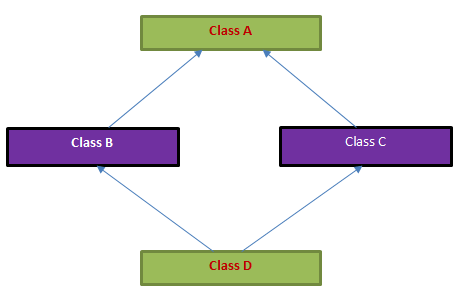
Because C++ allows for multiple inheritance, the diamond problem is a common issue. The "diamond problem" is inspired by the diamond shape that the inheritance hierarchy takes when the problem potentially occurs.

What is the diamond problem and what is the virtual base class in C++?

Let's look at an example that demonstrates this problem:


class A {

public:

    virtual void read();

    virtual void write();

};

class B : public A { 

public:

    void write();

};

class C : public A {

public:

    void read();

};

class D : public B, public C {

public:

    void read();

};

int main() { 

    D d;

    d.write();

}


Both B and C are using method write, class D doesn't know which write to use. This code will not compile, it will fail because of "ambiguous access of write".

The way memory works is, the implementation of two objects are stacked one after another. The base class A is duplicated inside B, then again inside C. And both B and C are duplicated inside D. So when an instance of D tries to call write, the compiler doesn't know to call A::B::write() or A::C::write()


How to resolve this? We can rename the methods so that they are different. But if we don't want to, there are two ways.

1) Use a fully qualified function name

E.g. 

d.B::write(); // code will now compile 


2) Use virtual inheritance


Virtual Inheritance:

class B : public virtual A { // "public virtual" or "virtual public" are equivalent

    public:

    void write();

};

class C : public virtual A {

    public:

    void read();

};


Using the virtual keyword in the inheritance process, we ensure that class D will only have one copy of class A inside it. The code will now compile and instances of D will call the write() method from B because it's closer in the inheritance hierachy.


Constructors and Virtual Inheritance:

Because there is only a single instance of a virtual base class that is shared by multiple classes that inherit from it, the constructor for a virtual base class is not called by the class that inherits from it (which is how constructors are called, when each class has its own copy of its parent class) since that would mean the constructor would run multiple times. Instead, the constructor is called by the constructor of the concrete class. In the example above, class D directly calls the constructor for A. If you need to pass any arguments to the A constructor, you would do so using an initialization list.


One thing to be aware of is that if either class B or C invoked the A constructor in their initialization lists, that call will be completely skipped when constructing an instance of class D. Be careful when using virtual inheritance and test the constructors prudently.


Let's take a look at the order of construction and destruction in virtual inheritance:

int main() {
    D d;

}

The order is: C D ~D ~C ~B ~A

So what did we learn? Because of virtual inheritance there is only one copy of A in the definitions so A is only called once. If we didn't have virtual in heritance, both C() and D() constructors would call A() since they are derived classes and we would have: B A C D ~D ~C ~A ~B ~A. See C++ Constructors and Initializer Lists 


E.g. With initializer lists and parameterized constructors

class A {

public:
    A(int x) { cout << "Ax" << endl; }
    A() { cout << "A" << endl; }
    ~A() { cout << "~A" << endl; }

};

class B : public virtual A {

public:
    B(int x): A(x) { cout << "Bx" << endl; };
    B() { cout << "B" << endl; };
    ~B() { cout << "~B" << endl; }

};

class C : public virtual A {

public:
    C(int x): A(x) { cout << "Cx" << endl; };
    C() { cout << "C" << endl; };
    ~C() { cout << "~C" << endl; }

};

class D : public B, public C {

public:
    D(int x):B(x), C(x) { cout << "Dx" << endl; }
    D() { cout << "D" << endl; }
    ~D() { cout << "~D" << endl; }

};

int main() {
    D d;

}

What is the output?

Are you surprised it's: A Bx Cx Dx ~D ~C ~B ~A ?

This is to demonstrate the above comment about "if either class B or C invoked the A constructor in their initialization lists, that call will be completely skipped when constructing an instance of class D". We can see that this is true - both class B and C have A(x) in their initializer lists, but Ax never printed. What happened was D constructor calls B and C with parameterized values but because A is virtually inherited the initializer lists doesn't get called.


And yes, after removing the write and read methods, and removing virtual inheritance, we get the expected output:

Ax Bx Ax Cx Dx ~D ~C ~A ~B ~A


Object Size and Virtual Inheritance:

Let's start with a motivating example:

E.g.


class B {

    int arr[10];

};

class B1: public B {};

class B2: public B {};

class Derived: public B1, public B2 {};

int main(void) {

    cout << sizeof(Derived);

}

Assuming integers are 4 bytes, what gets printed?

80

Yes, because the Derived class inherits from both B1 and B2, two copies of the arr member are in the derived class.


What about if we used virtual inheritance? Assuming everything else stayed the same?

class B1: public virtual B {};

class B2: public virtual B {};

Now it prints 48. Saves a lot of space! 8 extra bytes are allocated for bookkeeping information stored by the compiler.

C++ Inheritance
June 11, 2020 by Jane

Abstract Classes & Interfaces
Object slicing
Dynamic Casts & Typeid
Polymorphism & Virtual Function Tables

This is an addition to Object-Oriented Concepts

Another relevant post The Diamond Problem and Virtual Inheritance


Abstract Classes:

C++ doesn't have the keyword "abstract" like in some languages, but it does have the concept of a pure virtual member function - a function without an implementation; a function purely meant for inheriting, to be implemented by derived classes. Classes that have a pure virtual member function are the same as abstract classes in other languages, since the class cannot stand on its own.


To declare a pure virtual member function, assign the function declaration to 0.

E.g.

virtual double perimeter() const = 0;


Interfaces:

Similarly, C++ doesn't have the keyword "interface" like some languages, but commonly, if a class has only pure virtual member functions, it is equivalent to an interface.


Polymorphism:

class P {

public:

   void print() { cout << "Inside P"; }

};

class Q : public P {

public:

   void print() { cout << "Inside Q"; }

};

class R: public Q {};

int main(void) {

  R r;

  r.print();

}

What gets printed? Inside Q is correct. The R class doesn't have a print() method, so it looks up the inheritance hierarchy and the one that's closer to class R is used.


Virtual Function Tables (vtables):

Virtual function tables enable polymorphism to happen. Behind the scenes each virtual function implemented by the class is placed in a vtable. Each object has a vtable pointer that points to the virtual function appropriate for the object. 

Instances of the same class point to the same vtable. Derived instances have their own vtables.

E.g.

class Employee {

public:

    string name;

    int salary;

    int get_salary() { return salary; }

    string get_name() { return name; }

};

class Manager : public Employee {

private:

    int get_bonus() {return 500;}

public:

    int get_salary() { return salary + get_bonus(); };

};

Each instance of Employee consists of:

  • name
  • salary
  • vtable pointer
    • points to vtable for class Employee which contains:
      • Employee::get_salary
      • Employee::get_name

Each instance of Manager consists of:

  • name
  • salary
  • vtable pointer
    • points to vtable for class Manager which contains:
      • Employee::get_name
      • Manager::get_salary


Object Slicing:

Object slicing happens when assigning a derived instance to a base class. 

E.g. 

class A {

    int m_i;

    virtual void print() { cout << "A" << endl; }

};

class B: public A {

    int m_j;

    virtual void print() { cout << "B" << endl; }

};

void callMe(A obj) {

    obj.print();

}

int main() {

    A a;

    B b;

    callMe(a);

    callMe(b);

}

This will print "AA" because once b is passed to the function, the derived class object is sliced off and all the data members inherited from base class are copied. So the overrided print() is not copied, nor is m_j.

To avoid slicing, do not assign derived classes to base classes, instead use pointers.

E.g.

void callMe(A& obj) {

    obj.print();

}


void callMe(A* obj) {

    obj->print();

}

int main() {

    A a;

    B b;

    callMe(a);

    callMe(b);


    A *pa = new A();

    B *pb = new B();

    callMe(pa);

    callMe(pb);

}

This will print "AB" and "AB" because we're passing a reference to the callMe() function.

Similarly:

int main() {

    A *a = new A();

    A *b = new B();

    a->print();

    b->print(); 


    callMe(a);

    callMe(b);

}

This will also print "AB" and "AB". This is because when the pointer is initialized the vtable pointer uses the vtable for object B and at run time the correct method is called.


Dynamic Casts:

The dynamic_cast operator requires a type as a template parameter, followed by a parameter that must be a pointer or reference. To use a dynamic cast, objects must belong to a class with at least one virtual function. Also note that RTTI must be enabled for this to work.

E.g. Assuming Manager and Employee take a name and salary as constructor parameters. Manager is a derived class of Employee.

Employee * e = new Manager("Sarah", 3000); // assignment of manager to employee is an upcast

Manager * m = dynamic_cast<Manager*>(e); // dynamic cast from employee to manager is a downcast

If the dynamic cast succeeds, m is a valid pointer, otherwise m is a nullptr. We always need to check if the cast succeeds, then proceed.

If Employee e was a reference instead of pointer and the dynamic cast fails, a bad_cast exception will be thrown since there's no nullptr for references.


Typeid Operator:

Another way to know the type of an object is to get its typeid. 

E.g.

#include <typeinfo>

int main() {

    Employee e;

    cout << typeid(e).name() << endl; // will print "class Employee"

    cout << typeid(Employee).name() << endl; // will also print "class Employee"


    Employee * eptr;

    cout << typeid(eptr).name() << endl; // will print "class Employee *"

    cout << typeid(&e).name() << endl; // will also print "class Employee *"

    cout << typeid(Employee*).name() << endl; // will also print "class Employee *"

}

*In general it's not good design to use typeid to query the type. We should use polymorphism as much as possible. If the code requires using typeid very often, perhaps it's time to re-examine the relationships of the objects in the program.

C++ Class Methods
June 10, 2020 by Jane

Methods and const methods
Inherit vs. Extend vs. Replace base class methods
Shadowing

Methods:

Declare all accessor functions with "const" keyword.

Sometimes there will be read-only copies of the same method, with and without "const"

E.g.

class Test {
public:   
    void print() const { cout << "const " << endl; }
    void print() { cout << "not const" << endl; }
};

int main() {

    Test t;

    // prints "not const" because t is not declared with "const" modifier

    t.print(); 


    const Test c;

    // prints "const" because c was declared with "const" modifier; it can only invoke the const methods

    c.print(); 

}

Note that if we didn't have a const print() method the program above would not compile. Instead it would give an error that says: cannot convert "this" pointer from "const Test" to "Test &"


Inherit vs. extend vs. replace base class methods:

Inherit: makes no modifications to the base class's implementation of the method, basically will not mention the method in the derived class

E.g. 

class A {
public:   
    void print() { cout << "print" << endl; }
};

class B : public A {

};

In this example class B inherits the print() method from class A. It doesn't mention the method anywhere in its class definition but any instance of class B will be able to call the  print() method because it has been inherited


Extend: makes an implementation of the base class method and calls the base class method implementation with [baseClassName]::method() then adds its own customization

E.g.

class A {
public:   
    void print() { cout << "print" << endl; }
};

class B : public A {

public:

    void print() { A::print(); cout << "B prints" << endl; }

};

In this example class B inherits the print() method but overrides it by defining a method with the same signature. Inside its implementation it calls the inherited method print(), here we're using the scope resolution symbol (::) to indicate we want to call the print() implementation from class A. This is an examples of B extending the implementation of the print() method from A.


Note that if we didn't use the scope resolution symbol to indicate we're calling the base class implementation (A::print()), the derived implementation (B::print()) would be called and result in an infinite loop. 


Replace: supply a new implementation of the method without any reference to the base class's implmentation

E.g. 

class A {
public:   
    void print() { cout << "print" << endl; }
};

class B : public A {

public:

    void print() { cout << "B prints" << endl; }

};

In this example class B inherits the print() method but overrides it without any reference to the inherited method. The print() method from A will not be called at all when print is invoked on an instance of B. In other words, the print() method has been entirely replaced in class B.


Shadowing:

E.g. 

class A {

public:

    int foo()  { cout << "A::foo"; }

    int foo(int i)  { cout << "A::foo with i"; }

};

class B: public A {

public:

    int foo() {  cout << "B::foo"; }

};

int main() {

    B b;

    b.foo(5);

}

What is the expected behaviour here? It will not compile. The compiler will probably complain about there being too many arguments in the function call.

The reason for this is if a derived class writes its own method, then all functions of base class with same name become hidden or shadowed, even if signaures of base class functions are different. The foo in class B hides all of the implementations of foo from class A, even the overloaded ones.


How to solve this? Use the scope resolution operator to call class A's implementation:

b.A::foo(5); // will print A::foo with i

C++ Access Specifiers & Friends
June 10, 2020 by Jane

Public, private, and protected keywords as access specifiers and in inheritance
Friends

Access specifiers:

Private: accessible by only the class it is declared in

Public: accessible by everyone, including derived classes

Protected: accessible by only the class it is declared in and derived classes, not commonly used and is considered an advanced topic.

  • Some programmers argue that protected data fields are usually a bad idea because the derived classes may corrupt the base-class variables.
  • An alternative is to leave the data fields private and provide derived classes with protected accessor methods

E.g. Notice the const modifier to ensure that it's a read-only method

class Char {

public:

    virtual void draw() const;

protected:

    double value_at(int index) const;

private:

    vector<double> data;

};


Access specifiers in inheritance:

Public: the most commonly used inheritance access specifier, grants derived class with public and protected access members and methods from the base class.

E.g.

class A {

private: 

    int pr_i;

public:

    int pu_i;

protected:

    int pt_i;

};

class B: public A {

};

Class B has access to pu_i and pt_i but not pr_i.


Private: Rarely used, this the default inheritance specifier if not provided. The inherited methods, members of the base class will be marked with "private" access specifier in the derived class. This means that if another class derives the derived class it will not have any access to the base class's members nor methods.

E.g. default inheritance specifier. Assume class A has definition as above

These two are equivalent:

class B: private A {};

class B: A {}; 

B has access to pu_i and pt_i but not pr_i, which is expected. Now if we have another class that derives B:

class C: public B {};

C doesn't have access to any of A's members or methods, even if we put "public" in front of B


Private inheritance above is equivalent to this:

class B {

private: 

    int pr_i;

    int pu_i;

    int pt_i;

};

class C: public B {

};

We can undersstand now why C doesn't have access to any of  pr_i, pu_i, pt_i even if we put "public" in front of B.


Protected

Advanced topic.


Friends:

  • Friends of an object can either be a function or a class
  • The friend function or class has access to all private features of the class.
  • The function declaration or class name must be explicitly named within the class definition of the one sharing their members, friend declaration placement is same anywhere, no matter under private/protected or public accessor modifiers friends will access to everything
  • Friends are not inherited
  • If A is a friend of B does not imply B is a friend of A


E.g.

class A {

private:

    int m_x;

    int m_y;

    friend class B; // class B has access to private members of A

    friend int calculateFoo(int a, int b); // the function calculateFoo has access to private members of A

};

Common uses:

  • output stream operator that requires access to the inner state of an object

E.g.

class Employee {
public:
    Employee(string employee_name, double initial_salary);
private:
    string name;
    double salary;
    friend ostream& operator<<(ostream& out, const Employee& e);
};
ostream& operator<<(ostream& out, const Employee& e) {
    out << "Employee: " << e.name;
    return out;
}


C++ Constructors and Initializer Lists
June 10, 2020 by Jane

Constructors
Destructors
Static member and methods
Initializer Lists
Order of initialization for derived classes and member variables

Constructors:


1) Default constructors: a constructor that creates and object without parameters.

C++ provides us with default constructors for all the classes. However there might be times where we need to customize it for our own needs.

E.g. 1. Basic example

class B {

public:

    B() { cout << "B" ; }

    ~B() {cout << "~B" ; }

};

class A: public B {

public:

   A() { cout << "A" ; }

   ~A() { cout << "~A" ; }

};


int main() {

    A a;

}

The program prints:

B, A, ~A, ~B

Because class A inherited B, its constructor is implicitly called when A is constructed. Then they're destroyed in reverse order when the variable goes out of scope.


E.g. 2. More complex example with inheritance

class F {
public:
    F() { cout << "F" << endl; }
    ~F() { cout << "~F" << endl; }
};

class G : public F {
public:
    G() { cout << "G" << endl; }
    ~G() { cout << "~G" << endl; }
};

class H : public F {
public:
    H() { cout << "H" << endl; }
    ~H() { cout << "~H" << endl; }
};

class I : public G, public H {
public:
    I() { cout << "I" << endl; }
    ~I() { cout << "~I" << endl; }
};


int main() {

    I test; 

}

The program prints:

F, G, F, H, I, ~I, ~H, ~F, ~G, ~F // The F class constructor is called twice because both G and H are derived classes


2) Constructors with parameters:

It's possible to overload the constructor with the same name but different parameters to use in different object-creation situations.

class Employee {

private:

    string name;

    int initial_salary;

    Time clockIn;

public:

    Employee() {

        name = "staff";

        salaray = 3000;

    }

    Employee(string employee_name, double initial_salary)
    {
        name = employee_name;
        salary = initial_salary;
    }

    Employee(string employee_name, double initial_salary, int arrive_hour)
    {
        name = employee_name;
        salary = initial_salary;

        clockIn = Time(arrive_hour, 0, 0);
    }

};

We can define even more versions of constructor of the Employee object with different parameters.

Note there is an inefficiency in initializing inside the constructor body, especially if the member variables are complex objects themselves. For example the Time member "clockIn" will be initialized twice, once with the default Time() constructor and once more with the parameterized constructor called explicitly. It's more efficient to use initializer lists to call the parameterized version right away.

Employee(string employee_name, double initial_salary, int arrive_hour)

    :clockIn(arrive_hour, 0, 0)
{
    name = employee_name;
    salary = initial_salary;

}

Static member and methods:

  • Static variables in a class is like a global class member that is visible to all instances of the class
  • No matter how many objects of the class are created, there is only one copy of the static member.
  • The static variable is independent of any instance of the object. It exists even if no objects of the class are instantiated
  • A static member function can only access static data member, other static member functions and any other functions from outside the class.
  • Static member functions have a class scope and they do not have access to the this pointer of the class.
  • Static variables and methods are evoked with the scope resolution operator :: 

E.g.

class A {

public:

    static int x;

    static void printX() { cout << x << endl; }

};

int A::x; // to rid of linker error we need to define an integer like this outside somewhere.

int main() {

    int foo = A::x;

    A::printX(); 

}


Initializer List: 

Always use initializer lists when you can, they optimize the initialization process and make the code look cleaner.

E.g. Basic Example

Class C {

private:

    int m_int;

public:

   C(int x) : m_int(x) {}

};


E.g. Example with inheritance

class C {

protected:

    int m_int;

public:

   C(int x) : m_int(x) { cout << "C" << endl; }

};

class D : public C {

public:

    D(int x) : C(x) { cout << "D" << endl; } 

};


E.g. Difference between using and not using an initializer list

class F {
public:
    F() { cout << "F" << endl; }

    ~F() { cout << "F" << endl; }
};

class G : public F {
public:
    G(): F() { cout << "G" << endl; }

    ~G() { cout << "~G" << endl; }
};

int main() { G g; }

This prints (this is actually the same if we didn't explicitly call F() in the initializer list, but imagine if we wanted to pass some stuff) :

G

~G

~F


All is well. Now what if we didn't initialize F with initializer list in G but put it in the function body?

G() { F(); cout << "G" << x << endl; }

This gets us:

F
F  
// extra work is done here
~F // extra work is done here
G
~G
~F

So takeaway is to always use initializer lists when you can. But it's probably good to know the nitty-gritty details so we can use it with more confidence. Let's read on.


C++ prevents classes from initializing inherited member variables in the initialization list of a constructor. In other words, the value of a variable can only be set in an initialization list of a constructor belonging to the same class as the variable.

E.g. The following will not compile

class D : public C {

public:

    D(int x) : m_int(x) { cout << "D" << endl; } // will not compile because m_int is not a member of D

};


Initialization order:

From cppreference:

1) If the constructor is for the most-derived class, virtual bases are initialized in the order in which they appear in depth-first left-to-right traversal of the base class declarations (left-to-right refers to the appearance in base-specifier lists)

2) Then, direct bases are initialized in left-to-right order as they appear in this class's base-specifier list

3) Then, non-static data member are initialized in order of declaration in the class definition.

4) Finally, the body of the constructor is executed

So the order of the initializer list doesn't affect the order of initialization. The order of initialization is largely determined by their order of declaration in the class definition. Another way to think of it is - if initialization order was controlled by the appearance in the member initializer lists of different constructors, then the destructor wouldn't be able to ensure that the order of destruction is the reverse of the order of construction.


E.g. Here, even though the initializer lists is in the order of m_z, m_y, m_x, the actual order is m_x, m_y, m_z because of the order of declaration in the class definition.

class J {
private:
    int m_x;
    int m_y;
    int m_z;

public:
    J(int x, int y, int z) : m_z(z), m_y(y), m_x(x) {}
};


Knowing this, it would be a bad idea to do something like this:

class J {
private:
    int m_x;
    int m_y;
    int m_z;
public:
    J(int x, int y, int z) : m_y(y), m_z(z), m_x(m_y + m_z) {}
};

And as expected, printing the values gives us the following because m_x was initialized with garbage values.

x : 11021326, y: 2, z: 3

The solution in this case  is to use the local values: (extra parentheses are needed)

J(int x, int y, int z) : m_y(y), m_z(z), m_x((y + z)) {}

Output:

x : 5, y: 2, z: 3


As initialization becomes more complex, we can even insert try-catch clauses in the initialization:

class T()  {

    T(double a) {}


    // function-try block begins before the function body

    T() try

        : T(1.0) {

        // function body

    }

    catch (...) {

        // exception occurred on initialization

    }

};


E.g. More complex example with inheritance


Object-Oriented Concepts & Design
June 10, 2020 by Jane

Inheritance & Multiple Inheritance
Encapsulation
Polymorphism

Inheritance

Mechanism for enhancing existing classes, reusing code

E.g. Manager inherits the name, salary and print() method from Employee. This makes it easier to change code or add functionality in the future.

class Employee {

public:

    string name;

    int salary;

    void print() { cout << name << " : has salary " << salary << endl; }

};

class Manager : public Employee {

};


Multiple Inheritance (MI)

Multiple inheritance is allowed in C++. Because of the complexity MI involves, sometimes good programming practices discourage against using MI. Here are some precautions:

1) No class can be its own direct or indirect parent.

  • This prevents the inheritance diagram from ever having cycles. A directed graph with no cycles is termed a directed acyclic graph, or DAG. Class diagrams for classes with multiple inheritance are one example of a DAG.

2) One must not abandon the is-a relationship that exists between base and derived classes.

  • A common mistake is seeing that a car has an engine and a body and then having the car inherit both of these classes. This is inappropriate.
  • An example of appropriate multiple inheritance is the case of a teaching assistant (TA) being both a student and staff. The teaching assistant class may inherit both base classes of student and staff because a TA is both a student and staff.

3) Consider alternative designs to capture the relationship:

  • Inherit multiple interfaces is sometimes a better choice as it avoids ambiguity
  • Having nested classes could also be a good choice as the nested class can maintain an instance of the outer class.


Encapsulation

The act of hiding implementation details is called encapsulation.

E.g. Here the getCost method returns the cost of the product. The details are hidden and makes the API simple to use and easy to change. For example in the future the tax rate may change for the different regions we don't need to change the public section of the class, only the getTax() method.

class Sale {

private:

    double price;

    double getTax(int region) {...};

public:

    double getCost() { return price + (price * getTax(0); }

};


Polymorphism

Objects can with the same base class can behave as their derived classes in run time when it's appropriate.

E.g.

class Employee {

public:

    string name;

    int salary;

    Employee(string n, int s) : name(n), salary(s) {}

    int getPay() { return salary; }

};

class Manager : public Employee {

private:

    int calculateBonus() { return 500; }

public:

    Manager(string n, int s) : Employee(n, s) {}

    int getPay() { return salary + calculateBonus(); }

};


Here we have different implementations of getPay() for employee and manager. What if we have a list of employees and managers mixed together and want to get their pay with a single for loop or function call? Polymorphism allows us to do that. But first we need to add "virtual" to the getPay() method so that the compiler knows it could potentially be overrided by derived classes. This is an example of dynamic binding.  The method getPay() is dynamically bound whereas the regular methods are statically bound. The difference is statically bound methods are selected at compile time, and dynamically bound method is selected at run time.

class Employee {

public:

    string name;

    int salary;

    virtual int getPay() { return salary; }

};

A reference from Big C++ on virtual:

  • The virtual keyword must be used in the base class. All functions with the same name and parameter types in derived classes are then automatically virtual. However, it is considered good taste to supply the virtual keyword for the derived-class functions as well. Whenever a virtual function is called, the compiler determines the type of the implicit parameter in the particular call at run time. The appropriate function for that object is then called.

E.g. This will call the correct getPay() method on the manager and employees.

vector<Employee*> allEmployees = vector<Employee*>(3);
allEmployees[0] = new Employee("John", 3000);

allEmployees[1] = new Employee("Joe", 4000);
allEmployees[2] = new Manager("Jay", 4500);

for (int i = 0; i < allEmployees.size(); i++) {
    cout << allEmployees[i]->getPay() << endl;
}

This will print:

3000

4000

5000

The manager got his/her bonus of 500 added because polymorphism called the correct method at run time.


Another note - we used a vector of Employee pointers in this example. Is it possible with vector of Employees? The answer is no.

The reason is the derived classes are typically larger than the base classes and a vector of objects cannot deal with variation in sizes and therefore the derived instances will get sliced away. So we must use a pointer because pointers to various objects all have the same size - the size of a memory address.


What if we used a vector of Managers to store all the employees? Since the derived classes are typically larger, we surely cannot fail by using the larger of the two objects? The answer to this is no. We cannot use a vector of type "Manager" to store objects of type "Employee" because of the inheritance hierarchy. A Manager is an Employee, but an Employee is not necessarily a Manager. The code will not compile.


Lastly it is possible to make a vector of Managers and create all employees as managers with bonus of $0. However this defeats the purpose of separating the concept of Employees and Managers. Why even have two classes at this point?

Testing Methodology
June 10, 2020 by Jane

Verification vs. Validation
Proving vs. Testing
Unit, integration, regression, system, acceptance testing
Continuous Integration
Equivalence Partitioning
Boundary Value Analysis
Class Testing

Verification vs. Validation

  • Verification: did we build the system right? Does it work well?
  • Validation: did we build the right system? Does the system fit the client's requirements? Are the features the ones that match the specs?


Proving vs. Testing

  • Proving: using mathematics and logic to prove that the program is logically sound and has no bugs
    • In general this is very difficult to do and very expensive
    • Statically analyze the program with logic
  • Testing: using real-life input and check-expects to see that the program does what it should
    • Can only show the presence of bugs, but not absence
    • Dynamically execute the program with input


Types of Testing

  • White-box testing: the tester can see implementation of the system
  • Black-box testing: the tester cannot see the implementation, can only interact with the user interface of the system
  • Unit testing: testing the smallest unit of a program - functions in isolation
  • Regression testing: testing against a set of past failures
  • Integration testing: individual units are combined and tested as a group
  • show that major subsystems work well together
  • System testing: test large parts of the system, using different configurations in different environments
  • Recovery testing - forcing the software to fail and verify that it can recover as expected (power failure, OS failure etc)
  • Security testing - verify that software is resistant towards malicious intent
  • Stress testing - put the system under stress in various ways and test how it fares
    • quantity of input
    • speed of input
    • extreme CPU/memory conditions
  • Acceptance testing: test with respect to requirements to ensure the software satisfies the acceptance criteria


Continuous Integration (CI)

Developers continuously commit code to a pipeline that automatically builds and tests the program.

  • This can include performance tests, regression tests, unit tests
  • Report is usually automatically generated and stored for those who are responsible to look after CI


Testing Methodology

  • Harness: a short program that calls the function to be tested and verifies that the results are correct.
  • Test coverage: try to cover each branch of the function. There should be at least one test for each of the branches
  • Boundary cases: legitimate inputs that are on the boundary of illegal input.
  • Test suite: a collection of test cases
  • Cycling: a phenomenon sometimes happens when bugs cycle back due to bandaid fixes that didn't fix the root issue.
  • Equivalence Parititioning: because the input domain of methods are usually too large to test exhaustively, split the input domain into categories that will be treated similarly, test a few inputs from each category to ensure different types of inputs are tests, but not too many test cases are needed
  • Boundary Value Analysis:  take special care when testing boundary cases, tests should include tests on the boundary and on both sides of the boundary to ensure the decisions the program makes for those particular values are correct


Class Testing

  • Classes are different from testing individual functions because classes are typically stateful systems.
  • Classes can store states with member variables; the methods evoked may have side-effects not observed by the return statement
  • Convert the class into a finite state machine (FSM), and test the graph that is produced from this FSM
    • Each state may have a set of expected behaviour (nodes of the graph)
    • Each state may have triggers that transition it to a different state (edges of the graph)
    • The combination of state behaviour and state transitions may create loops or paths that have a set of expected behaviour (paths of the graph)
C++ Strings
June 09, 2020 by Jane

String methods
Pretty-print

Definition:
 

#include<string>

string empty; // default uninitialized string is ""

string str1 = "C++ string";


Common String Methods

length() returns the length of the string, or the number of characters in the string

substr([start], [opt length]) returns a substring of the original starting at index "start" and continue for "length" characters. If length is not given, assume the substring will continue till end of original string

E.g.

string greet = "hello";

string substring = greet.substr(1, 4); // substring contains "ello"


Formatting Strings and Numbers

setw([width])

  • print the string with specified width, needs to be set for every item

setfill([filler character])

  • used together with setw() to format or pretty-print strings/numbers 

setprecision([precision])

  • print the number with the precision specified, only needs to be used once to set precision for the stream
  • used fixed if trailing zeros are needed (see example below)


E.g. 1. setfill() + setw()

cout << setfill ('x') << setw (10); cout << 77 << endl; // prints xxxxxxxx77


E.g. 2. fixed + setprecision()

for (int year = 8; year <= 10; year++) {
    double interest = balance * rate / 100;
    balance = balance + interest;
    cout << setw(2) << year << ": " << fixed << setprecision(2) << balance << endl;
}

// Output:

 8: 14071.00 // because we set "fixed", the trailing zeros are there; setprecision doesn't actually ensure trailing zeros are added
 9: 15513.28 // notice that 8 and 9 are flush with 10 because we had setw(2) on the year variable.
10: 16288.95 


C++ Numbers
June 09, 2020 by Jane

C++ number types and their ranges and sizes
Common math library functions
Casting
Type Range Size Format Specifier
char Not usually used to represent numbers but can store -128 to 127 1 byte %c
int -2,147,483,648 to 2,147,483,648 4 bytes %d
unsigned int 0 to 4,294,967,295 4 bytes %u
short -32,768 to 32,767 2 bytes %d
unsigned short 0 to 65,535 2 bytes %u
long long -9,223,372,036,854, 775,808 to 9,223,372,036,854,775,807 8 bytes %ld
double

double-precision floating  point, range: +/- 10^308 with 15 sig figs

  • 1 bit for the sign
  • 11 bits for the exponent
  • 52 bits for the value
8 bytes %lf
float

single-precision floating point, range: +/- 10^38 with 7 sig figs

  • 1 bit for the sign
  • 8 bits for the exponent
  • 23 bits for the value
4 bytes %f


Beware of modulus of negative numbers:

E.g. a% n where a is negative will return a negative number. To get a number that is positive use n-1-(-a-1)%n where a is the number, n is divisor


Popular Math Functions:

 #include<algorithm>

  • max / min
  • abs
  • floor / ceil
  • sqrt / pow


Casting:

If we assign on variable of type double to another variable of type int we will probably get a warning about the implicit conversion. To write better and safer programs we should explictly cast the number if that is the intention.

E.g.

double my_double = 3.5

int my_integer = static_cast<int>(my_double)


Random Number Generation:

#include <ctime>

#include <cstdlib>
int main() {

    srand(time(0));

    int randInt = rand();

}

TCP vs UDP
May 29, 2020 by Jane

UDP is unreliable, connectionless, simple, and each packet must attach the IP addr and port #
TCP is reliable, connection-oriented; handshake must be performed before anything can be sent over. Connection is kept open and can be reused till closed.


TCP UDP

Reliable data transfer 

Utilises retransmission to ensure RDT and uses cumulative ACKs and fast retransmission to maximize sender utilization. Timeout is long but as soon as 3 duplicate ACKs are received it will re-send the packet with smallest unacked sequence#.

Unreliable data transfer
Flow control - traffic control, receiver won't be overwhelmed (this is done by the receiver giving information about available buffer space or "rwnd" value in TCP header. sender ensure to limit number of in-flight data to below the rwnd value No flow control

Congestion control -

TCP slow start (cwnd set to 1 MSS then doubled per RTT).

After cwnd reaches slow start threshold (ssthresh) it switches to congestion avoidance (CA) state where cwnd grows linearly until loss occurs (+ increase, * decrease or AIMD - additive increase multiplicative decrease)

cwnd += MSS every RTT till triple duplicate ACK detected then cwnd /= 2; Repeat.

If timeout occurred reset cwnd to MSS and ssthresh to 1/2 cwnd before the timeout.

  • MSS is max segment size
  • cwnd is congestion window size
No congestion control
Data received will be in order Data may be received out-of-order

Connection-oriented (3-way handshake)

1) Client -> SYN -> Server

2) Server -> SYNACK -> Client

3) Client -> ACK -> Server

Connectionless (Sender explicitly attaches IP destination addr and port # to each packet)


What do TCP and UDP have in common:

  • Utilizes sockets
  • A method to transfer data through the transport layer
  • No encryption, clear text passwords are sent (SSL is used to provide the encryption layer)
JS declarations: const, let, and var
May 23, 2020 by Jane

Summary:
var - variables are hoisted and belong to global Window object. Redeclaration within same scope is allowed
const - not hoisted, must be initialized at declaration, cannot be reassigned
let - like const but reassignment is allowed

var


Global variables defined with the var keyword belong to the window object. 

E.g. var myname = "Jane"; // we can access myname using window object i.e. window.myname will return "Jane"

E.g. let myname = "Sonia"; // we can NOT access myname using the window object 


let


let is a ES5 keyword that declares a local variable inside a scope (defined by {}). 

Global variables defined with the let keyword do NOT belong to the window object unlike variables declared with var

let variables can only be redeclared in a different scope than an existing let variable.

Hoisting doesn't happen to let variables, so the variables must be declared before they can be used


const

const is an ES5 keyword that declares a local variable inside a scope (defined by {}). 

const is like let, except the variable cannot be reassigned any other values. Similar to constexpr in C++, the const variables must be initialized at declaration.

Although const variables cannot be reassigned, they can be modified. Objects' properties and array's elements can be modified and have push(), pop() operations performed on them.

Similar rules apply to const variables as let variables in terms of redeclaration and hoisting.

JS ES5 "use strict"
May 22, 2020 by Jane

No fear. Strict mode is here.
TL;DR - strict mode is a feature of ES5. It should always be used, it makes the JS we write more organized and reliable by raising errors for unintentional variable declarations and disallowed actions etc.

Javascript is one of those languages, that after learning C++ or C, one might find too casual or forgiving. No fear. Strict mode is here. Simply put "use strict"; at the top of the function or script and the browser will do the rest. This feature is available IE10 and later.


A summary of what strict mode prohibits.

1) Variables used before they are declared

2) Deleting variables and functions or undeletable properties such as "prototype"

3) Duplicating parameter names

4) Octal numerals and escape characters (numbers prefixed by 0 or \0)

5) Writing to read-only object property indicated by writable:false or get-only property

E.g. var obj = {}; Object.defineProperty(obj, "x", {value:0, writable:false}); obj.x = 3.14; is illegal

E.g. 2. var obj = {get x() {return 0} }; obj.x = 3.145; is illegal (this is similar to C#)

6) "eval", "arguments","public", "private" etc are keywords or potential keywords and cannot be used as variable name. eval() also cannot create variables.

7) "with" expressions are not allowed

8) "this" keyword is undefined unless specified


JS Regex
May 22, 2020 by Jane

JS Regex

JS has search(), match() and replace() methods for strings that allow regular expressions. Let's take a look at how to work with regex!


* Notice that regex expressions are not surrounded by single/double quotes, instead are surrounded by backslashes i.e. \pattern\[modifier]


Modifiers: (*these modifiers can be combined - simply write them one after another, order is not important)

Case-insensitive - i

E.g. var x = 'Hello"; str.search(/hello/i) will return 0, but str.search("hello") will return -1 since h is capitalized.


Global search - g

Find all matches in the given string, do not stop after finding the first occurrence.


Multiline search - m

Match ^ beginning to beginning of a line (specified by \n or \r in the string), $ to end of line instead of string


Metacharacters and character classes:

In summary: placing characters and patterns next to each other implies AND, using pipe "|" to separate them implies OR. Placing a ^ in front of a pattern implies NOT. With these we can create logical AND/OR/NOT statements to filter out string we don't want or find the strings we want.

Find any character/digits - [matches]

E.g. Find any characters in e,d,c, use [edc],

E.g. 2. Find any number in 0-9 use [0-9]

E.g. 3 Find any characters in range a-c use [a-c]

E.g. 4 Find any characters in range d-g or numbers 2 -4 use [d-g2-4] 


Find any character/digits that's not the ones specified- [^matches]

E.g. Find any number not in range 0-4 use [^0-4]


Find any of these patterns - ( pattern1|pattern2|pattern3...)

E.g. Find any words that match "ok" or "all" use (ok|all)

E.g. 2. Find any that has digits 0-4 or letter a use ([0-4]|a)


Find any alphanumeric character - /w (shorthand for /[A-Za-z0-9_]+/)

Find any non-alphanumeric character - /W


Find any digit - /d 

This is equivalent to [0-9]


Find any non-digit - /D

This is equivalent to [^0-9]


Find any whitespace - /s

Find any non-whitespace - /S


Find blank and characters before or after space - /bCHARS or CHARS/b


Dot wildcard "."

means match any character so \.un\ will match fun, sun, pun, run etc..


Quantifiers:

?    means 0/1 (memory aid: 0/1 is binary binary or conditional (true/false), ternay operator uses question mark "?" )

  means 1+ (memory aid: 1+, one or more) This can be a bit tricky sometimes because if we want to match any alphanumeric we use /\w/, but if we want to match 1+ (2 alphanumerics at least) we use /\w+/. In a string like "hi, how are you", /\w/ will return [h,i,h,o,w,a,r,e,y,o,u] but /\w+/ will return [hi,how,are,you]

*    means any quantity (memory aid: select * means select any in SQL or * meaning wildcard)

^    means beginning of string (memory aid: start on a good note -- goes up -- the caret looks like an up arrow) * this is different from the NOT operator in the metacharacteristic as the caret goes inside the square brackets. [^pattern] means exclude this from results. ^[pattern] means matches the beginning of the string to the pattern. This doesn't have to be used with [], it can also be used simply like /^Cal/ - find Cal at the beginning of the string.

$    means end of string  (memory aid: one gets paid at the end of the day -- dollar sign means end) 

?=    (a.k.a. positive lookahead) means followed by (but doesn't have to be immediate)  E.g. [pattern1](?=[pattern2]) means return the string that matches pattern1 with another string matching patter2 after it some n chars away 

?!    (a.k.a. negative lookahead) is the opposite of ?= E.g. [pattern1](?![pattern2]) meaning return the string only if it matches pattern1 yet is not followed by pattern2 anywhere

{a,b}     indicates the min and max count of the occurrence, if b is not given it means a or more counts of the occurrence, if the comma is not included and simply {a} is provided it means look for exactly a number of occurrences.

([pattern])     Match groups - regex can also be used to extract information for further processing. For example you could use a pattern such as ^(IMG\d+\.png)$ to capture and extract full image filenames, but if you only wanted to capture the filename without the extension, you could use the pattern ^(IMG\d+)\.png$ which only captures the part before the period.

  • Capture groups can also be nested - you could extract both the filename and the picture number using the same pattern by writing an expression like ^(IMG(\d+))\.png$ (using a nested parenthesis to capture the digits).

([pattern])\n    (a.k.a. capture group), must be preceded by a pattern surrounded by parentheses. The number n refers to which capture group should be repeated. E.g. /(\w+)\s\1/;  means find two words that are the same, separated by a space. 


Common Regex Methods/Functions:

  • Test([string]) method:
    • A simple way to check if a regular expression match is found in a string is to use the test() method. Returns boolean
      • [regex].test([str]); E.g. myRegex.test(myString); 
  • Match([regex]) string method:
    • Tries to find the regex and return it, the result itself is an array of strings that match the regx, but it also has properties index and input
      • str.match([regex]) E.g. myString.match(myRegex)
      • if found the return value is a string, the retval.index is the index of the string in the input, and retval.input is the original string
  • replace([regex], [replace string]) method:
    • Finds the regex and replaces it with the replace string specified.
    • If using capture groups, the replace string can swap the order of the captured groups with $[order] as follows:
      • let str = "one two three";
      • let fixRegex = /(\w+)\s(\w+)\s(\w+)/; // this will capture "one", "two", "three" in the three capture groups 
      • let replaceText = "$3 $2 $1"; // this will reverse the order of the words
      • let result = str.replace(fixRegex, replaceText); // output will be "three two one"


Greedy and Lazy matches:

A greedy match finds the longest possible substring that matches the given regex. This is the default mode of regex matching.

A lazy match finds the shortest. To find the shortest use ? after the wildcard * or + to get the lazy match. 

E.g.

let a = "helllllllo";
let r = /hel*/;  will return "helllllll" , the longest match possible

if r = /hel*?/; the match will return "he", the shortest match possible


E.g. 2

let a = "helllllllo";

let r = /he.+/; will return "helllllllo" the whole string because it's greedy matching

r = /he.+?/; will return "hel" the shortest lazy match


For more advanced topics in regex:

https://www.w3schools.com/jsref/jsref_regexp_dot.asp

JS Type Conversions
May 22, 2020 by Jane

JS type conversions summary

In Javascript there are two ways to convert types:

1) JS conversion function

2) JS does it implicitly


1) Using Functions:

From\To Object Date Number Array String Boolean
Object \ Already an object valueOf() valueOf() valueOf() valueOf()
Date Already an object \

Number([date])

getTime()

N/A

toString()

String([date])

N/A
Number Not good practice

new Date(ms)

\ N/A

toString([base])

toExponetial()

toFixed()

toPrecision()

String([number])

Boolean([number])
Array Not good practice N/A reduce() \

join([delimiter])

reduce()

every()

some()

reduce()

String Not good practice new Date(str)

Number([string])

parseInt([string])

parseFloat([string])

unary + operator

split([delimiter])

for(... of ...)

\ Boolean([string])
Boolean Not good practice N/A Number([boolean]) N/A

toString()

String([boolean])

\


2) Automatic conversion:

When trying to output a variable to HTML, JS will automatically call the toString() method.

E.g. document.getElementById("demo").innerHTML = myVar; 


Using operators between different types will also automatically convert them.

E.g. "5" + 5 = "55"


Also calling if statements will automatically try to convert them to boolean 

E.g. if(myVar) // here the variable is forced to become a boolean


Automatic conversions in general:

Conversions to boolean: 0, empty, undefined, null, elements are converted to false. The rest are converted to true.

Conversions to string: most elements will convert to how they look, aside from empty arrays and strings will be simply empty string -- ""

Conversions to number: most strings will be parsed correctly if they're valid numbers i.e. "100", NaN if they're not i.e. "apple". Empty, false, null will be converted to 0, undefined and arrays which cannot be properly parsed will be NaN.

If in doubt it's probably best to do a quick experiment in the browser.

JS Dates
May 22, 2020 by Jane

JS Dates

Creation: (*The computed date will be relative to your time zone, if unspecified, JS uses the browser's time zone)

1) Default:  new Date() or Date.now() will return ms since 1970 Jan 1

2) Custom human-readable: new Date(yr, mon, day, hr, min, sec, ms) - the year and month are required, rest can be omitted

  • the year can be 4 digits or 2 digits (1900 will be assumed)
  • the month can be 0 - 11

3) Custom milliseconds: new Date(ms since 1970 Jan 1) - the milliseconds can be negative

4) From string: new Date([date_string])

  • E.g. new Date("October 13, 2014 11:13:00");
  • From ISO format YYYY-MM-DD - new Date("2015-03-25");


Format:

1) toString() - also the default method.

  • Converts to [Day_of_week], MMM DD YYYY HH:MM:SS [Time Zone Code]  [Time Zone]
  • E.g. "Fri May 22 2020 03:46:58 GMT-0700 (Pacific Daylight Time)"

2) toUTCString()

  • Converts to [Day_of_week], DD MMM YYYY HH:MM:SS [Time Zone Code]
  • E.g. "Fri, 22 May 2020 10:48:41 GMT"

3) toDateString() - shorter and more day-to-day version

  • Converts to [Day_of_week] MMM DD YYYY
  • E.g. "Fri May 22 2020"


Commonly used accessors:

  • getFullYear() - return YYYY
  • getMonth() - return MM (0 - 11)
  • getDate() - return day as number (1 - 31)
  • getDay() - return day of week (0 - 6)
  • getHours - return hour (0 - 23)
  • getMinutes() - return minutes (0 - 59)
  • getSeconds() - return second (0 - 59)
  • getMilliseconds - return ms (0 - 999)
  • getTime() - return ms since 1970 Jan 1


* These accessors all have corresponding setters to set the full year, month, day etc.

  • setFullYear can also set month and day E.g. setFullYear(2020, 11, 3);
  • If the parameter is not within range E.g. setMonth(13) the overflow will flow into the year automatically, similarly a negative value can be use to set the time to the past

More info: https://www.w3schools.com/js/js_date_formats.asp

JS Arrays and Common Properties and Methods
May 22, 2020 by Jane

JS Array Common Properties and Methods

Javascript arrays do not need to have uniform type. So a single array may contain a mix of numbers, strings, objects, other arrays etc.

E.g.

let arr = ['cat', 5, 'dog']  // this is allowed


Javascript arrays can be accessed and modified using indexing notation.

E.g.

let arr = ['cat', 'dog', 'mouse']; 

arr[0] // returns 'cat'

arr[0] = 'giraffe' // now arr[0] stores giraffe instead of cat


* Although strings behave like arrays in that they can be accessed with indexing notation, we cannot modify them using indexing or methods like push or pop on the strings like we do on arrays. Strings are immutable!


Common array properties:

  • length - returns number of elements in the array E.g. var x = [1, 2, 3]; x.length -> 3


Common array modifiers: (*these functions modify the array objects which they are called with; no need to reassign to save change)

  • sort([compare_func]) / reverse([compare_func]) - sorts the array in ascending / descending alphabetical order unless compare_func is given
    • sorting function should take two parameters and return an integer < 0 if smaller, 0 if equal, and > 0 if greater. 
      • E.g. a typical numeric compare function would be function(a, b){return a - b}
  • push([new_element]) - inserts the new element given to the end of the array
  • pop() - returns the last element of the array and at the same time removes it from the array
  • shift() - returns the first element of the array and at the same time shifts all subsequent elements one index lower, overwriting the first element
  • unshift([new_element]) -  shifts all elements in the array up one index and inserts the new element at index 0 and returns the new array length
  • delete arr_x[index] - is equivalent to arr_x[index] = undefined;  Doesn't work on entire array, only elements. E.g. delete arr_x doesn't do anything
  • *fill([fill_value], [startInd], [endInd]) - fill the array with the fill value. Indices are optional - default startInd is 0, default endInd is array.length. The endInd is exclusive; if provided, the element at endInd itself won't be filled.


Queries: (*strings can use these methods as well, these do not modify the arrays/strings themselves)

  • Array.isArray([variable_in_question]) - returns true if the variable given is an array (since typeof will return object for arrays and objects)
    • This is available in ES5 and later, alternative ways to do this 
      • function isArray(x) {  return x.constructor.toString().indexOf("Array") > -1;}
      • x instanceof array will also return true if x is an array
  • indexOf([search_val], [startInd]) - similar to string's indexOf returns the lowest index of the search element if found, -1 if not found. An optional starting index parameter can be used to optimize the search
  • lastIndexOf([search_val], [startInd]) - same as indexOf except in reverse order starting at the end of the array searching towards the beginning
  • *find([bool_func]) - returns value of the first element which the boolean function returns true.
    • the functions has the following signature: function([value], [index], [parent_arr]) the last two parameters are optional and can be omitted.
  • *findIndex([bool_func]) - like find() but returns the index instead of value
  • **includes([search_val], [startInd]) - returns true if the search element is found in the array, false if not. Optional parameter to indicate the starting search index.

Format:

  • toString() - returns a string with each element of the array separated by a comma
  • join([delimiter]) - returns a string with each element of the array joined by the given delimiter. The default delimiter is comma if unspecified.
  • *keys() - returns an array iterator object consisting of keys or indices of the array.
    • To iterate through this object, first assign iterator to variable E.g. var keys = arr.keys(); then use for... of ... E.g. for (x of keys) { do something with x}
  • *entries() - returns an array iterator object consisting of key-value pairs
    • To iterate through this object, first assign iterator to variable E.g. var entries = arr.entries(); then use for... of ... E.g. for (x of entries) { do something with x}
      • x will be a comma-separated key-value pair 


Common array methods: (*strings can use these methods as well, *these functions do not modify the array objects which they are called with; need to reassign to save change)

  • splice([startInd], [nElemsToRemove], elemToAdd1, elemToAdd2...) - removes n elements starting at startInd, adds the additional elements at the startInd if given. The additional elements are optional.
  • concat([arr_to_append1], [arr_to_append2]) - returns an array where the arr_to_append(s) are appened to the end of the array object with which the function is called. The parameters doesn't have to be strictly arrays, they can also be elements. E.g. arr_x.concat(arr_y) is legal, so is arr_x.concat(1) or arr_x.concat('apple');
  • slice([startInd], [endInd]) - very much like the string's slice method which returns a substring starting at startInd and ending but exclusive of endInd, it returns a subarray starting at startInd, ending but excluding endInd element. The endInd is optional, and without it all subsequent elements will be in the subarray just like the string's slice. E.g. var arr = ['a', 'b', 'c']; arr.slice(1) ->  ['b', 'c']. var str = "hello"; str.slice(1) -> "ello".


Common iteration methods: (*strings cannot use these methods; these functions do not execute on the indices which do not have values i.e. holes in the array, also these methods do not modify the original, must be reassigned to be meaningful. Supported in IE9 and later)

  • foreach([function]) - passes each element to the function given as the value parameter.
    • the functions has the following signature: function([value], [index], [parent_arr]) the last two parameters are optional and can be omitted. The function returns undefined and this is intentional
  • map([function]) -  creates a new array and then performs the function on each element of the array
    • the function has the same signature as foreach however the function should return something as the new value to be written to the new array
  • filter([bool_func]) - creates new array and then only adds the element from the original to the new one if the given function returns true
    • the function has the same signature as foreach however the function should return a boolean to act as a filter whether the element "passes" or "gets filtered"
  • reduce([acc_func], [initial_value]) - goes through the array and returns a single value
    • the acc_func (acc is short for accumulator) has the following signature: function([total], [value], [index], [parent_arr]). The last two parameters can be omitted. The "total" is an accumulator element that keeps track of "total" so far. 
    • The function needs a return statement, usually this will include the accumulator variable "total"
    • The reduce method takes optional initial_value parameter which will be assigned to the accumulator "total" in the beginning, by default the accumulator is initialized with the first element in the array
  • reduceRight([acc_func], [initial_value]) - the same as reduce but starts at the end of the array
  • every([bool_func]) - like filter() but returns a single boolean that is the result of logical-AND of all the elements evaluated through the boolean function
  • some([bool_func]) - like every() but returns the logical-OR of all the elements evaluated through the boolean function


* Recent feature: IE12 and later (please check other browser versions before using)

** Recent feature: ES7, IE14 and later (please check other browser versions before using)

JS Numbers
May 22, 2020 by Jane

JS Numbers

Integers:

JS integers are accurate up to 15 digits.


Floats:

In JS, the decimal numbers are always stored as floating point numbers, bits 0 - 51 are the value or fraction. Bits 52-62 are the exponent, the signed bit is bit 63.


Exponents:

12e5 = 12 * 10^5 = 1 200 000

25e-5 = 25 * 10^ (-5) = 0.00025


Special JS Numbers:

  • NaN: What if we have a string that's not a number? E.g. "x" / "10" = NaN (not a number)
    • isNaN([variable_in_question]) is a function used to check if the variable in question is a valid number and will return false if the variable isn't. The type of NaN is still a number. Any math operations with NaN will return NaN. 
  • + / - Infinity: Infinity is the value given to a number out of range for JS numbers. Infinity also has type of number. (This can be assigned like so: var x = -Infinity or  var x = Number.NEGATIVE_INFINITY); Positive version is var y = Infinity or var y = Number.POSITIVE_INFINITY;
  • Number.MAX_VALUE returns the largest number possible in JS (2^1024), anything higher will overflow to +Infinity.

  • Number.MIN_VALUE returns the smallest number(closest to 0) possible in JS (5^-324)


Hexadecimal: use 0x prefix like many other hexadecimal representations. E.g. 0xFF


Queries: (*functions must be called on the Number object and will return false if given any non-number type variables)

  • Number.isInteger([value_in_question]) returns true if the value given is an integer, returns false on all other values such as decimals, infinities etc.
  • Number.isSafeInteger([value_in_question]) returns true if the given value can be represented as IEEE 754 double precision number: -(2^53-1) to 2^53-1
  • Number.isFinite([value_in_question]) returns true if the given value is finite.


Conversions:

  • toString([base]) is a method used to convert numbers to strings according to the base. The default is base 10 if not given.
  • valueOf() is a method that converts a number object to a primitive number. However because good programming practice discourages creating number objects with "new" this method should really never be used under regular circumstances.
  • Number([variable]) is a global JS function (not a method) that converts variable given to a number if possible and returns NaN if not possible. E.g. Number(true) -> 1; Number("10.33") -> 10.33 etc. but Number("some") -> NaN. Whitespace is trimmed but commas are not recognized. This function can also convert a date to the number of miliseconds that have passed since 1970 Jan 1.
  • parseInt([string], [base]) is a global JS function that takes a string and returns and integer if possible, NaN if not possible. Decimals will be truncated. If the string contains more than one number only the first number will be returned. It works with hexadecimal as well E.g. parseInt("0x10") -> 16. Base can be integers 2 - 36 but is optional.
  • parseFloat([string]) is a global JS function that takes a string and returns a float if possible, NaN if not possible.


Formats:

  • toExponential([digits_behind_decimal]) is a method used to format the number in exponential notation, rounded to the number of digits given. The default is unrounded and the number keeps its value but the notation will change to exponential notation. E.g.  (956).toExponential() -> 9.56e+2
  • toFixed([digits_behind_decimal]) is a method used to round the number to given number of places. Default is 0, round to nearest integer E.g. (96.66).toFixed(1) -> 96.7
  • toPrecision([num_sig_figs]) is a method used to round the number to the given number of significant figures. E.g. (9.78).toPrecision(2) -> 9.8


Combining Numbers:

One interesting phenomenon in JS is that strings if used with math operators, will first try to be converted to numbers. The only exception is the concatenation operator +.

E.g. "10" + "10" = "1010" but "10" - "10" = 0 (notice that the result is a number) the same goes for "10" * "10 = 100 and "10" / "10" = 1

JS String methods
May 21, 2020 by Jane

JS String methods

Javascript string methods Summary.


**Note that these methods do not modify the string object itself, so the resulting string must be reassigned for the operation to be meaningful. In Javscript strings are immutable.


Length:

Although string length is not a method, it's a property - this is one of the most commonly used functionalities for a string. 

str.length will return the length of the string, no brackets since this is a property


Template Literals (ES6):

Similar to C#, in JS it's possible to use back tics and dollar sign followed by curly brackets surrounding the variable name as place holders to format strings. This process is called "string interpolation".

E.g.

const myPet = 'dog';

console.log(`I own a  ${myPet}`); //will output "I own a dog"


Get/From character:

In general use charAt() and charCodeAt(). To treat strings as arrays convert them first using var str_as_array = str.split("");

  • charAt([index]) returns the character at the index
  • charCodeAt([index]) returns the Unicode representation (integer 0 - 65535)
  • str[index] returns the character at the index
  • fromCharCode([unicode1], [unicode2], [unicode2] ... ) the reverse function of charCodeAt(), returns the character(s) from the unicode number(s)


Queries:

These methods are available IE11 or later. They can be replaced with indexOf() and seeing if the returned index is -1 if using IE10 or earlier

  • startsWith([str]) returns true if a string starts with str
  • endsWith([str]) returns true if a string ends with str
  • includes([str]) returns true if str is a substring


Search for substring:

These methods will return -1 if the substring is not found. In general, use indexOf to search for first occurence of and lastIndexOf to search from end of the string. The search method is for more complex regular expressions. An additional optimization can be made to search from a starting index if the substring must be before/after a certain index. This only applies to indexOf and lastIndexOf methods, search() doesn't have this optional parameter.

  • indexOf(substring, [startingSearchIndex])
  • lastIndexOf(substring, [startingSearchIndex])
  • search(substringOrRegex)


Splitting strings:

In general slice() will be sufficient for all variations of splitting strings in different places and also accepts negative indices to start counting from the end of the string. The end index is optional for these methods as it will assume the end of the string if end index is not given.

  • slice([startInd], [endInd])  the end index is not included in the resulting string, use negative indices to count from end of string (IE9 and later). If the endInd is not given, the function assumes end of the string.
  • substring([startInd], [endInd]) doesn't accept negative indices. The endInd is also optional similar to slice()
  • substr([startInd], [length]), accepts negative indices like slice(), user-friendly option to provide length as second parameter


Edit strings:

  • replace([existing], [new]) accepts regular expressions E.g. /existing/i for case-insenstive, /existing/g for global (replace all occurences)
  • toUpperCase(), toLowerCase() to convert entire string to a certain case
  • trim() removes whitespace (IE9 or later)


Convert to array:

Use split([delimiter]) to split a string into array

Examples:

  • str.split(" ") to split sentences to array of words
  • str.split('"") to convert string to array of characters (delimiter is empty string )
  • str.split(",") to split comma-separated values into array of values

Special case str.split() will return an array with the entire string in first element of array or array[0]


Advanced:

If using IE8 or earlier, and trim or other functionalities do not exist, we can do the following to ensure that trim works by using replace with regex.

if (!String.prototype.trim) {
  String.prototype.trim = function () {
    return this.replace(/^[\s\uFEFF\xA0]+|[\s\uFEFF\xA0]+$/g, '');
  };
}
var str = "       Hello World!        ";
var trimmed = str.trim();

JS Events
May 21, 2020 by Jane

JS Events

JS events: HTML events are "things" that happen to HTML elements. JS can be used to react to these events.

We can do insert small snippets of JS into the HTML by doing: onclick='some JS code' or onmouseover="some JS code" (single or double quotes are fine)

With <button onclick="document.getElementById('demo').innerHTML = Date()">The time is?</button> the element of ID "demo" will be changed.

With <button onclick="this.innerHTML = Date()">The time is?</button> the button element referred by "this" will be changed.


To have more complex actions we can write a JS function and trigger it this way:

<button onclick="displayDate()">The time is?</button>


Common events include: onchange, onclick, onmouseover, onload, onkeydown, onmouseout.

Events can be triggered by: mouse, keyboard, progress, animation, page transition, download, clipboard, touchscreen etc.

Full list: https://www.w3schools.com/jsref/dom_obj_event.asp

JavaScript Operator Precedence Values
May 21, 2020 by Jane

JavaScript Operator Precedence Values

Javascript operator precedence values is a very useful and fundamental concept that is core to understanding how to read, write, and execute JS.

A way to explain this is using a math example:  5 + 6 * 2 = 17 because BEDMAS, and (5 + 6) * 2 = 22 also because of BEDMAS. The JS operator precedence values is kind of like BEDMAS for JS.


Let's summarize it in a table.

Operator type Value Operator Description Example
Generic 19 () Brackets (5+6)*2
Objects 18 . Get value of member person.age
Objects 18 [] Get value of member person["age"]
Functions 17 func() Function call function(param)
Objects 17 new Create object var a = new Car()
Math 16 ++ / -- Posfix inc/decrement i++; i--;
Math 16 ++ / -- Prefix inc/decrement ++i; --i;
Logic 15 ! Logical NOT !enabled
Math 15 Unary negation -y
Generic 15 typeof Returns type of the variable typeof y
Math 15 ** Exponentiation x ** 2
Math 14 * / % Multiply/Divide/Modulus a * b / 11 % 2
Math  13 + / -  Addition/Subtraction a + b - c
Math 12 >> / << / >>> Shift left/right/zero-fill a << 2
Comparison 11 >= / <= / > / < Greater than, less than etc a >= b
Objects 11  in  Returns true if object contains property if ('age' in person)
Objects 11 instanceof Returns true if object is instance of class x instanceof Person
Comparison 10 ===/==/!==/!= Strict equal/equal/unequals if (x === '2')
Bitwise 9 & Bitwise AND 0101 & 0001
Bitwise 8 ^ Bitwise XOR 0101 ^ 0001
Bitwise 7 | Bitwise OR 0101 | 0001
Logic 6 && Logical AND enabled && alive
Logic 5 || Logical OR canWalk || canFly
Conditional 4 ? :  Ternary condition  y = x ? 2 : 3;
Assignment 3 +=/-+/*=/>>= etc. Math operator combined with assignment x += 1
Control-flow 2 yield Pause function yield x
Generic 1 ... Spread operator f(... iterable);
Generic 0 , Comma var a = 2, b = 3;

The greater the value the more precedence it has when executed in combination with the others.

The expressions in brackets will be evaluated and then the rest of the evaluation(s) will continue.


How can we remember such a long list? It's no longer simple and easy like "BEDMAS".

We can summarize it as follows: Brackets, Members, Functions, (new is a constructor call), Unary (logical and math), Typeof, Exponent, Multiply/Divide (modulus can be grouped together with division), Addition/Subtraction, Shifts, GL comparisons (greater and less than), "in" operators (in and instanceof), Equal comparisons, Bitwise, Binary logical, Ternay, Assignment, Yield, Spread, and Comma.


Using a few memory aid mnemonics:

Betty Might Feel Uneasy Typing Essays.  (Brackets, Members, Functions, Unary, Typeof, Exponents)

May Day Approaches So Slowly. (Multiplication, Division (modulus), Addition, Subtraction, Shifts)

Good Luck In Equalizing Big Binges. (Greater Less than comparisons, "in" operators, Equal operators, Bitwise, Binary)

Today A Yellow Sun Climbs. (Ternary operator, Assignments, Yield, Spread, Comma)

Sit straight
May 17, 2020 by Jane

Sit straight

CSS: Visibility vs. Display
May 11, 2020 by Jane

A brief summary of differences between CSS properties "display" and "visibility"

Recently I learned about "visibility" in CSS2. I had been used to hiding elements with "display: none" so this really surprised me. So I looked into it a little bit. The two properties have many similarities such as being used to hide and display elements.

Their differences are two-fold:


1) Space - visibility hides the selected element however it still takes up the same amount of space, display: none will not take up space originally occupied by the element. The conseqence of this is if there are other elements after it on the page, the elements will move upwards if "display" is used but not if "visibility" is used.


2) Child element behaviours - visibility hides the element it is applied to but doesn't hide the child elements if the child's visibility is visible. Display:none will override all child element properties and none of its children will show no matter their "display" property.

C++ decltype
April 26, 2020 by Jane

Brief explanation of decltype (C++11 and after)

I have recently been studying the new features of C++ 11

The keyword "decltype" came up.

What is decltype? It evaluates expressions to types and is used in mostly generic or template programming. The cv-qualifiers are maintained if they are part of the expression. (cv-qualifiers are properties such as const and volatile)

For example if we were to write an addition function that accepts different types like so:

template <typename T, typename T2>

T add(T a, T2 b) {

    return a + b;

}

It's hard to say what the return type will be if we're adding a float and an integer etc there might be unpredictable casting.

E.g.

add( 1, 2.2) --> gives us 3

add( 2.2, 1) --> gives us 3.2

However by using "decltype" we can always be sure it will return the more precise cast

auto add(T a, T2 b) -> decltype(a+b) {
    return a + b;
}

We can even have finer control over the return type:

auto min(T a, T2 b) -> decltype(a < b ? a : b) {
    return a + b;
}

In general decltype will not be used in day-to-day programming but more in generics/template library construction where a lot of the times the types have to be inferred. 

Toggling Laptop Touch Screen on/off
April 22, 2020 by Jane

Sometimes laptops should just behave like laptops not tablets

Get the touch screen ID from Device manager.

Paste this text and save as a batch file and run it under administrator privileges.

set "touchscreenid=HID\VID_0457&PID_101F&Col01"
devcon status "%touchscreenid%" | findstr "running"
if %errorlevel% == 0 (
    devcon disable "%touchscreenid%"
) else (
    devcon enable "%touchscreenid%")

JUnit Tests Quick Start (Basics)
February 11, 2020 by Jane

Before I forget how to setup Java JUnit tests again, let's write it down. :D

After re-organizing my Python code I have moved on to Java JUnit tests. I remember using this in school but unfortunately I forgot and had to look it up again. Steps are relatively straight-foward.

       1. In the package, add a new class, at the top of the file: import org.junit.Test; import static org.junit.Assert.*;

       2. If the imports above don't resolve, go to the package explorer -> right click on project -> Build Path -> Configure Build Path -> Libaries Tab -> Add Library -> Select JUnit (should already be in the list with JRE System Library, Maven Managed Dependencies and User Libary -> Next -> Finish

       3. Inside the class add tests with @Test Java annotation, use assertTrue/False/Null/NotNull/Equals/ArrayEquals etc to define the expected behaviour

       4. To test exceptions add @Test(expected = <Exception Class Name>.class) to the space above the function declaration. Note we don't need to assert anything unlike the other cases

             E.g. @Test(expected = IllegalArgumentException.class)

                  public void MyTest() {

                       my_function(a, b);

                  }

       5. When running the test, the IDE will usually let you choose between JUnit test and regular Java Application. Select JUnit test. 

       6. The results will show the stats and if the tests failed there is a stack that can show which line was the failed test etc.

Python Unit Tests using unittest (Easy start!)
February 10, 2020 by Jane

Python unittest usage basics starting guide.

After using with GoogleTest for C++, I am moving on to Python. Since python has built-in library for testing, it's basically a no brainer. Therefore I'm using unittest for python

To be honest, I had a much easier experience with unittest than GoogleTest. Perhaps it is because I had used these during my co-op at eBrisk Video or what but it took only about 15 minutes to get it working. So before I forget again, I'm going to write a debrief for my future self.

  1. import unittest on top of all the test files
  2. import whatever modules and auxillary modules that is going to be tested
  3. class <TestThisModule>(unittest.TestCase):  inherit the unittest.TestCase class
  4. def test_<test_case_name>(self): python's unittest has discovery feature that assumes all functions starting with "test" are tests and will be automatically run
  5. In the test functions use self.assertTrue/False/Equal etc to test for the validity of output
  6. if __name == '__main__': unittest.main()  write this at the bottom (the unittest.main() should be on the next line and indented) so the file can be run separately on its own
  7. I suggest using classes to group together tests for the same function and files to group the tests together for the same structure or object, in any case keep things organized so it's easy to see what is being tested and what is expected etc.

Robust coding here I come!

Using GoogleTest for C++
February 10, 2020 by Jane

Striving for robust code

During my working on CTCI (cracking the coding interview), as the code became more complex and numerous I began to feel less secure about the robustness of my code. Also reading the Unix Philosophy it kept emphasizing on robustness and I figured that testing was worth spending some time on. 


For C++ there are many choices, the few that popped up during my search were Catch, Boost, and GoogleTest. In all honesty I didn't expect myself to end up with GoogleTest because I had wanted a relatively simple and straight-foward solution.


I tried Catch (now Catch2) first. All it required was a header include. However I think because I was using Visual Studio 2013 Express to write my code, the header file didn't compile. I could either figure out the compilation issue or move on to a different solution. The docs on Catch didn't really offer much debugging details so I moved on to googletest and proceeded to download the files on my Windows 10 laptop and compiled them with CMake. However something disagreed and I think it was complaining that my build tools were too old. 


I caved and downloaded Visual Studio 2019 and it's a very enjoyable experience. It also has a GoogleTest quick start project which is searchable - WOW, kudos to the dev team to make this so smooth for us. So I actually didn't need to build the GoogleTest and import the .lib files! Yay.


Issues arised when I tried to use this on my Windows 8.1 (but more powerful core i7) laptop and I ended up upgrading to Windows 10 since the Windows 8.1 SDK was depreciated. 


Of course the upgrade had its kinks - the sound, monitors, and search were not working right after the upgrade. : ( It took ~ one and a half day to get everything working normally again. :D


But all this effort was worth it. I became more confident in my ability to deal with computer hardware and IT stuff like upgrading drivers and whatnot. 


In the end I currently have ~150 tests to test my code from chapter 1-3. This gives some confidence that the basics work, and that I do have a way to validate my work (to some extent). Of course with C++ there's always possibility for memory leaks so there's always room for improvement testing-wise.


However I'm quite happy with the GoogleTest setup and will re-iterate it here:


  1. Create new visual studio project and search for googletest 
  2. Name it and create filters for source files and header files
  3. Code as usual. (In the new VS need to include "pch.h" in every .cpp file)
  4. If writing tests only there doesn't need to be a main because gtest (google test) will create a main for the user if not provided (there's also a setting in VS to change this if needed)
  5. The tests all start with TEST(<testSuiteName>, <testCaseName>) { <test content> }
  6. Use EXPECT_ when the failure is non-fatal (doesn't affect next steps of the test) and user ASSERT_ when the test failure is fatal and the rest of the test should be aborted. (E.g. if a previous function returns a value that will be read next.)
    • GoogleTest includes true/false, eq, ne, lt, gt, ge, le (i.e. ==, !=, >, <, >=, <=) for both EXPECT_ and ASSERT_ 
    • Strings have their own streq, strne, strcaseeq, strcasene (case means case-insensitive) for EXPECT_ and ASSERT_
    • Use "nullptr" when comparing pointers as it is typed 
  7. Run the tests by compiling and then running like usual. The green means pass and red means failed. (This can be customized in settings too)
I upgraded to Windows 10 and Search broke
February 05, 2020 by Jane

Youtube and Powershell saves the day.

Here's how it was fixed! Source: https://youtu.be/6OFLuAnaNtI

  1. Start Windows Powershell in admin mode
  2. PowerShell -ExecutionPolicy Unrestricted
  3. Get-AppXPackage -AllUsers |Where-Object {$_.InstallLocation -like "*SystemApps*"} | Foreach {Add-AppxPackage -DisableDevelopmentMode -Register "$($_.InstallLocation)\AppXManifest.xml"}
  4. $manifest = (Get-AppxPackage Microsoft.WindowsStore).InstallLocation + '\AppxManifest.xml' ; Add-AppxPackage -DisableDevelopmentMode -Register $manifest

Even though I got some errors on step 2 saying the action couldn't be completed because the resources it tries to write are being used, it still worked in the end.

Algorithm for working on a new question
January 28, 2020 by Jane

A little something from working on Cracking the Coding Interview by Gayle Laakmann McDowell

Below are the steps to take when faced with a problem that is foreign and not straightforward to crack. Consider this a template to use.

  1. Clarify the question - lowercase vs uppercase, how big is the characterset or number set? Are there negative numbers, duplicates etc?
  2. If an algorithm doesn't come to mind, use examples to clarify and digest the information given
  3. More examples, and try to see a pattern in the relationship between input and output
  4. Generalize the pattern for other values of N and other variations of the question. If stuck, consider looking at hints perhaps.
  5. Write the algorithm in pseudocode
  6. Check it over with the examples from above
  7. Implement in a few common languages of choice
  8. Test and check for correctness
  9. Look at the solution and compare your answer
  10. Revise and improve your answer as needed
  11. Summarize learnings:
    • Where else can I apply the algorithm? 
    • What would happen if the dataset changed to comething simpler or more complicated? (To include duplicates, negatives, characters other than ASCII... )
    • What if the requirements on space and time were more strict or less strict?
    • How would you rate the code in terms of efficiency (time and space) and readability?
    • What language(s) were easier for this question and what language(s) were more difficult to do correctly? 
    • What new concepts/optimizations have you learned from reading the solution and what are the implications towards future problem solving?
Django project learning summary
January 26, 2020 by admin

Some things I have learned in respect to DB, CSS, Design while working on this Django website

Django is a framework, when used together with a UI framework such as Bootstrap can speed up the construction of a webapp to within 1 week or so. Its structure is clear and scalable and once familiarized with the advantages are quite obvious because it does a lot of the typical web-app work for the developer.


Some take-aways from my first attempt using Django: steep learning curve - give a few weeks to familiarize with any new framework.
 

DB 

  • Try to use the same database during development and deployment that way you won’t have extra issues to deal with when you’re deploying like connector issues or version compatibility issues
  • Be careful changing database models because if it doesn’t work with your existing database the migrate might create issues.
  • Learn about more DB stuff in your spare time


CSS 

  • When trying to hide something, hide the larger enclosing HTML element, this not only makes the CSS more efficient, readable, but also makes the display of the inner part easier as sometimes they don't have to be hidden separately.
  • Use buttons when submitting a form
  • Some of the elements already come pre-styled so sometimes they need to overwritten
    • E.g. links are blue and underlined on hover, when clicked they’re purple
    • E.g. buttons have a border and background color and padding

Design

  • When making a feature, think about usability before styling anything because it might need to change
  • Think about user experience
    • What if they want to undo the change?
    • What if they forget their password
    • What if they misclick?
  • Think about different screen sizes and how to make it work for each of them. The HTML needs to be adaptable to other screens and Django doesn’t have ability to detect screen sizes.
  • In daily life, look at designs that work well and crop them and save them so when designing these can be a portfolio of ideas
  • Different states of the application needs to be considered
    • Logo placement
    • Certain icon placements only look good on certain places


Debug

  • The CSS - use outline: 1px solid black and background-color: red to see the element, use the developer console to hover on the element of interest
  • JS: use the developer console in FF and Chrome alert() and console.log()to see the errors and where the code execution failed
  • Django python print()
  • DB errors - mostly compatibility and migration issues. These can be fixed quickly by deleting the database but in practice it's probably best to not change any attributes related to keys because that causes most of the issues.